Monday, November 16, 2009

How does Laser printer works.....

It is always fascinating to see the link between mechanical and electrical world....where do they get in sync and how exactly they achieve something of a great use ? There are many widely used applications which actually have this combo and is of great help to humans. For quite sometime, I worked for a division which had similar goals for a particular such applications i.e. printers, scanners etc. While going through such an article, I thought to add something on such applications here....

Overview

In short, A laser beam projects an image of the page to be printed onto an electrically charged rotating drum coated with selenium, a special kind of element. Photoconductivity removes charge from the areas exposed to light. Dry ink (toner) particles are then electrostatically picked up by the drum's charged areas. The drum then prints the image onto paper by direct contact and heat, which fuses the ink to the paper.

In comparison with the laser printer, most inkjet printers and dot-matrix printers simply take an incoming stream of data and directly imprint it in a slow lurching process that may include pauses as the printer waits for more data. A laser printer is unable to work this way because such a large amount of data needs to output to the printing device in a rapid, continuous process. The printer cannot stop the mechanism precisely enough to wait until more data arrives, without creating a visible gap or misalignment of the dots on the printed page.

Instead the image data is built up and stored in a large bank of memory capable of representing every dot on the page. The requirement to store all dots in memory before printing has traditionally limited laser printers to small fixed paper sizes such as letter or A4. Most laser printers are unable to print continuous banners spanning a sheet of paper two meters long, because there is not enough memory available in the printer to store such a large image before printing begins.

Generating the raster image data

Each horizontal strip of dots across the page is known as a raster line or scan line. Creating the image to be printed is done by a Raster Image Processor (RIP), typically built into the laser printer. The source material may be encoded in any number of special page description languages such as Adobe PostScript (PS) , HP Printer Command Language (PCL), or Microsoft XML Page Specification (XPS) , as well as unformatted text-only data. The RIP uses the page description language to generate a bitmap of the final page in the raster memory. Once the entire page has been rendered in raster memory, the printer is ready to begin the process of sending the rasterized stream of dots to the paper in a continuous stream.
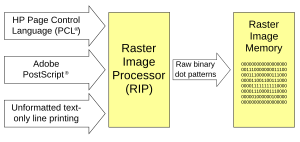

A lot more details are available here.


Wikipedia is great source for study on any kind of technical or non-technical stuffs. Wikipedia [books] are your best friends. Love the friendship to learn maximum of it :-)

Thursday, June 18, 2009

Linux boot......

While trying to gather more information on Linux boot process, I came through many links......An interesting information is the structure at the start of a hard disk in a PC, and how GRUB fits into that structure.

Also another good link on How Computers Boot Up

Another good article is Anatomy of a Program in Memory

For interested ones, there are a tons of useful articles on same page !

Have a great learning !!!

Wednesday, June 10, 2009

Quick Help.....1

I stuck up while launching my new vnc session because I got fade up of gnome so tried remembering how to switch the desktop....There was one way, I knew to go through START->More Preferences->Desktop Switching Tool. I tried it and it didn't work....that happens usually...you go to do something and you see some resistance :-)

A bit of googl[ing] helped again....

Run the utility switchdesk.....So in my case, I did this -


$$ switchdesk-helper
Please specify one of either KDE, GNOME, XFCE, FVWM or WindowMaker.
$$ switchdesk-helper KDE
Desktop now set up to run KDE.


Fantastic....Launched again the vncserver and I logged in into KDE Desktop. Hope it helps !

Wednesday, May 13, 2009

Adding new skills..........

A new skill addition seems like a must in such scenarios, I started on e-language which is specman technology, now owned by Cadence. It is a High Verification Language which has proved to be the best technology for verification.

While some reading stuffs collections, I found the following....

http://www.specman-verification.com/tutorial.php?page=specman_tutorial_p3#TheSpecialFeaturesOfE

The initial comparison of e-language to C/C++ seems fair enough. While random generation and coverage analysis could be good in both of them.....pure C/C++ lacks the simulation time notion and garbage collection. I realize that the kind of memory leaks, we see in almost every application, if we find in the complex designs verification platform, the life will be tough....and verification becomes nightmarish task.

More......

Recession.......ed....

"Recession is killing !"

There had been many downswings after Sept'2008. The nightmares started after Lehman brother's and Goldman Sach and big banking organizations surrendered to Sub prime crisis cum chaos in American banking sector(News).

There had been many news of disappointment and pessimistic in nature and in the Yr 2009 beginning, predictions were made that market is not able to recover early....I read an article in Times Of India, Delhi which mentions about a business analyst saying this -

"We should better retire for a year in some far islands" b'coz market will be crashing and there is no hope atleast for a year or even more than that.

In the article, author mentioned about the same analyst again appearing on some news channel and suggesting which are the picks of the markets :-(

An example of business analyst who make predictions which always go wrong.....and they change their statement every now and then ! Don't we listen them in all good times and curse in all the bad times ?

Anyways, There seems to be some optimistic views presented in the TOI, 12th May'2009 which says CHINA, INDIA lead to economic repairment and US, Europe will not be far from recovering....slightly behind potentially greatest economy CHINA and INDIA. Let's hope all settles well and we start listening the business anlaysts which saves them their job.

Wishing Great luck to all.....of US !

.....

Sunday, April 5, 2009

Google search.....

How to perform efficient search...using google search engine. As most of us already know the magical behavior of google for searches...it's highely been used in hacking stuff which is actually prohibited to access. It's a mamoth task to website admin to secure the data on the website. I found few links which can be of help for either performing a search......or to help admin to make the website secure (destructive mind....excuse me, please).

A bond link is -

http://johnny.ihackstuff.com

Johnny had been really impressive !!

A short note is also available which is more appropriate for new users or people who are more interested in direct searches for only their activities.....like GN, AT etc....they don't bother what may happen with the google magic..huhhhhhh, poor fellows !

http://www.informit.com/articles/article.aspx?p=170880

There are a tons of information available though and further could be explored using the tricks and techniques described here.

Enjoy Googling......!!!!!!

Wednesday, April 1, 2009

Article.....

This article appeared in Nov.'2008 in the edadesignline followed by many other magazines e.g. embedded.com, eetimes.com etc....This was selected also one of the best paper for 2008 !

http://www.edadesignline.com/howto/212000064

It was one of the top rated articles, as well for 2008 -

http://www.edadesignline.com/howto/top_rated/ (4.5/5.0) :)

The same article appeared again in eetimes, India in Mar'2009 -

http://www.eetindia.co.in/ART_8800566837_1800000_TA_bcb0d10f.HTM

It's a good feel.....you see !